

Getting the most out of your smartwatch or fitness band requires a reliable bridge to your smartphone. FitCloudPro is a versatile companion app designed to connect with a wide range of affordable smart wearables, syncing your health data and unlocking customization options. It allows you to track fitness metrics, receive smart notifications on your wrist, personalize watch faces, and manage device settings—all from a single, user-friendly interface. It's your central hub for maximizing the utility of your wearable device.
Core Features for Device Management
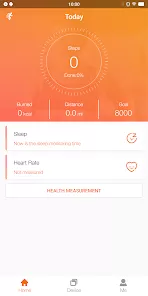
- Health & Fitness Data Sync: Tracks and displays data from your device, including steps, heart rate, sleep analysis, blood oxygen (SpO2), and multiple sports modes with summaries.
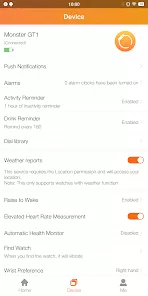
- Smart Notifications & Call Alerts: Forwards notifications from your phone (calls, SMS, social media apps) to your wrist. Allows you to reject calls or control music playback remotely.
- Custom Watch Faces & Settings: Offers a library of watch faces to download and apply. Lets you adjust device settings like display brightness, do-not-disturb mode, and sedentary reminders.
- Workout Tracking & GPS Support: Enables you to start and track specific workouts from the app. Can connect to your phone's GPS for accurate route mapping during outdoor activities.
- Device Utilities: Includes helpful tools like a "Find My Device" feature to make your band vibrate, and a remote camera control to use your wearable as a shutter button for your phone's camera.
Who Is the FitCloudPro App For?
- Owners of compatible smart bands and watches (often from generic or lesser-known brands that use the FitCloud platform).
- Individuals who want a straightforward app to view and analyze basic health metrics from their wearable.
- Users looking to customize their device's notifications and appearance without complex setup.
- Anyone seeking a free companion app for a budget-friendly fitness tracker or smartwatch.
How to Set Up and Use FitCloudPro
- Click “Check All Versions” below to download and install FitCloudPro on your device.
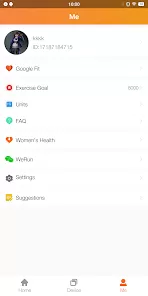
- Enable Bluetooth on your phone. Open the app, create an account, and grant necessary permissions.
- In the app, go to "Device" > "Add Device" and select your watch/band model from the list. Follow the on-screen pairing instructions.
- Once connected, explore the "Home" tab for your synced health data. Go to the "Device" tab to configure notifications, choose a new watch face, and adjust settings.
- Use the app regularly to review your activity, manage alerts, and keep your wearable customized to your needs.


 0
0