ADVERTORIAL
What is Remind: School Communication App?
In today's fast-paced educational environment, effective communication between teachers, students, and parents is essential. The Remind app has emerged as a powerful tool designed to facilitate this communication. Launched in 2011, Remind provides a platform that allows teachers to send messages, updates, and resources to students and their families quickly and efficiently. With a user-friendly interface and various features tailored to meet the needs of educational communities, Remind aims to enhance engagement and streamline communication within schools.
Features of Remind
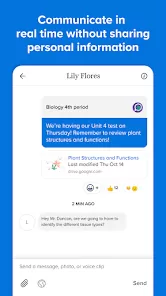
- Instant Messaging: Enables real-time communication between teachers and students or parents, allowing for quick updates and responses.
- Group Messaging: Teachers can create groups for classes or specific projects, making it easy to share information with multiple users simultaneously.
- Scheduled Messages: Users can schedule messages in advance, ensuring timely communication for events, reminders, or announcements.
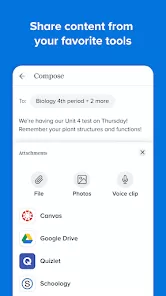
- Attachments: Teachers can attach files, such as documents, images, or links to resources, directly to their messages.
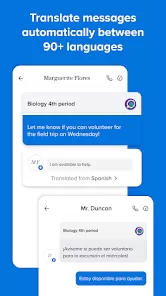
- Translation Services: The app offers translation features to help bridge communication gaps for non-English-speaking families.
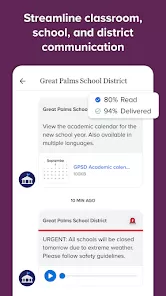
- Class Announcements: Teachers can post important announcements that all group members can see, ensuring everyone stays informed.
- Customizable Notifications: Users can tailor their notification settings to receive alerts for messages or announcements as per their preferences.
Pros and Cons of Remind
Pros:
- User-Friendly Interface: The app is easy to navigate, making it accessible for users of all tech-savviness levels.
- Increased Engagement: By facilitating open communication, Remind encourages greater participation from students and parents.
- Flexible Communication: The ability to send messages via app notifications or text messages allows users to choose their preferred communication method.
- Privacy Protection: Users can communicate without sharing personal phone numbers, enhancing privacy and security.
- Resource Sharing: The attachment feature enables teachers to share resources directly, promoting learning outside the classroom.
Cons:
- Limited Free Features: Some advanced features may require a premium subscription, limiting full functionality for users on the free plan.
- Over-Reliance on Technology: Excessive dependence on digital communication may reduce face-to-face interactions among students and teachers.
- Notification Overload: Users might feel overwhelmed by frequent notifications, leading to potential disengagement.
- Internet Access Required: The app requires internet connectivity, which may be a barrier for some users, particularly in underserved areas.
- Learning Curve for Some Users: While generally user-friendly, some less tech-savvy individuals may require assistance to navigate the app effectively.
Functions of Remind
- Messaging: Facilitates direct communication between teachers and their students or parents, enhancing the flow of information.
- Announcements: Allows teachers to post class announcements for all members to see, ensuring everyone is updated on important matters.
- Reminders: Sends reminders for assignments, tests, and events, helping students stay organized and on track.
- Feedback Collection: Teachers can use the app to gather feedback from students and parents on various topics, fostering a two-way communication channel.
- Event Coordination: Enables teachers to coordinate events and activities, making it easier for parents to stay informed and involved.
How to Use Remind
1. Download the App: Start by downloading the Remind app from the App Store or Google Play Store.
2. Create an Account: Sign up using an email address or phone number, then verify your account.
3. Join a Class: If you're a student or parent, enter the unique class code provided by your teacher to join their class group. Teachers can share their class code during orientation or through other communication channels.
4. Set Notification Preferences: Customize your notification settings to receive alerts via the app or text messages, based on your preferences.
5. Start Communicating: Once you’re part of a class, you can start sending and receiving messages, announcements, and attachments. Teachers can communicate with their students and parents, while students and parents can ask questions or provide feedback.
6. Access Resources: Check for shared files and resources regularly to stay updated on assignments and class materials.
7. Engage with the Community: Take advantage of the group messaging features to interact with classmates and parents, fostering a sense of community within the educational environment.





 0
0