
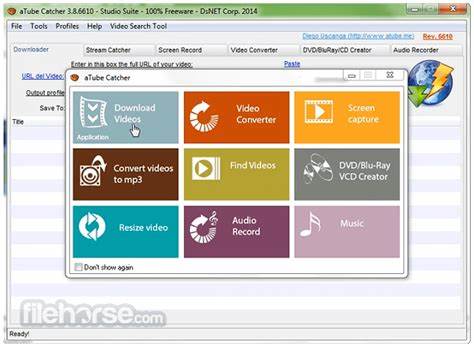
In today's digital landscape, online videos serve as a vast library of entertainment, education, and inspiration. Whether it's a tutorial you want to revisit offline, a music video for a road trip playlist, or a lecture series for study, the ability to save and convert this content for personal use is incredibly valuable. Yet, finding a reliable, versatile, and user-friendly tool to download and convert videos from countless websites can be a challenge. That's where aTube Catcher comes in. It's much more than a simple YouTube downloader; it's a comprehensive, all-in-one desktop application designed to be your go-to solution for capturing, converting, and recording digital media. With support for thousands of sites, a built-in video converter, screen recorder, and CD/DVD burner, aTube Catcher empowers you to build your personal media library with remarkable ease and flexibility.
Why You'll Love Managing Media with aTube Catcher
We built aTube Catcher to be a powerful yet accessible Swiss Army knife for digital media. It consolidates multiple essential functions into one free application, eliminating the need for separate, specialized software. Here's what makes it a standout choice for content savers:
- Wide Website Compatibility: Download videos and audio from a massive array of popular sites beyond YouTube, including Vimeo, Dailymotion, Facebook, and many more, all through a simple copy-and-paste interface.
- Built-In Video & Audio Converter: Don't just download—convert. Transform downloaded files into over 50 different formats optimized for any device, including MP4, AVI, MP3, WMV, and formats for iPhone, Android, PlayStation, and more.
- High-Quality Screen & Webcam Recording: Create your own content. Capture anything on your screen—from software tutorials and gameplay to webinars—or record directly from your webcam. Perfect for creating presentations or personal videos.
- All-in-One Media Toolkit: Burn video files directly to CD or DVD, rip audio from CDs, and even grab videos that are streamed through your browser with the integrated streaming video catcher. It's a complete media workstation.
Key Features for Complete Media Control
Beyond core downloading, aTube Catcher is packed with utilities that offer fine-grained control over your media:
- Batch Downloading & Queue Management: Add multiple video links at once and let the program download them in sequence. Manage your download queue, pause, resume, or prioritize tasks as needed.
- Quality Selection & Subtitle Download: Choose your preferred video resolution (up to 4K/8K where available) and download subtitles alongside your videos if they are offered by the source site.
- Scheduled Downloads & Shutdown: Set downloads to begin at a specific time (e.g., overnight) and even configure your computer to shut down automatically after all tasks are complete, saving time and energy.
- Simple, Straightforward Interface: Despite its powerful feature set, the application is designed with a clear tab-based layout, making it easy to find and use the exact tool you need.
How to Start Downloading and Converting
Getting started with your personal media management is straightforward. Here's your quick guide:
- Click the button “Check All Versions” below to download and install aTube Catcher from the official website onto your Windows PC.
- Launch the application. To download a video, simply copy the URL from your browser, paste it into the "Download" tab, and click "Paste URL." The app will fetch available formats.
- Select your desired video quality and output format (e.g., MP4 for video or MP3 for audio only). Choose your save folder and click "Download."
- To convert a file, go to the "Converter" tab, add your video file, select the target format (like AVI for a DVD or MP3 for audio), and start the conversion.
- Explore other tabs like "Recorder" for screen capture or "Burner" for creating DVDs to unlock the full potential of the software.
Your Desktop Media Hub
aTube Catcher stands out by offering a remarkably comprehensive suite of media tools in a single, free package. It addresses the common needs of students, educators, content creators, and everyday users who want to preserve, convert, and personalize online content. While it's important to respect copyright and terms of service, for lawful personal use, aTube Catcher provides the functionality and convenience that premium tools charge for. We invite you to explore a world where your favorite online videos, music, and streams are always within reach, in the perfect format for your needs. Unlock the full potential of online media with your own digital toolbox.


 0
0 